A customer sends a security questionnaire
Draft replies from your assessment findings and supporting evidence. See what has been checked and where evidence is still missing.
Business plan and above
See the evidence behind your answersINDEPENDENT CYBER ASSURANCE FOR SMALL BUSINESSES
Built for businesses using Microsoft 365. Bring automated checks and evidence from your IT team or provider together, so you can agree what needs attention.
 CyberProva
Sample data
THE PROBLEM
Your IT provider runs your systems and your Microsoft 365. But when an insurer, a customer or your board asks the question below, the answer is yours to give.
“How do you know those controls are actually in place?”
Automated checks verify selected Microsoft 365 settings. Other controls are supported by evidence reviewed by your organisation. CyberProva records that evidence and its review status; it does not independently verify the underlying facts.
43% of UK businesses reported a cyber security breach or attack in the preceding 12 months in the government's 2025/2026 survey. Read the UK government survey.
WHEN YOU NEED IT
Draft replies from your assessment findings and supporting evidence. See what has been checked and where evidence is still missing.
Business plan and above
See the evidence behind your answersInsurers ask about MFA, backups and admin accounts. See the evidence behind each answer before you sign the form.
Review evidence for your renewalPrepare for Cyber Essentials, a UK certification scheme, with checks mapped to its five technical control areas. Certification is carried out by an accredited Certification Body.
Explore evidence for UK Cyber EssentialsTurn technical findings into a one-page summary of checks, supporting evidence and outstanding actions.
Preview the board summaryBring the evidence and outstanding requests to your next service review, and agree priorities together.
Explore the IT provider approachHOW IT WORKS
Connect Microsoft 365 for automated checks, or start with an evidence-based assessment.
For anything that can't be checked automatically, send your IT provider a secure link. They upload proof without creating an account.
Review each piece of evidence against the control it supports, and accept or reject it.
Prioritised findings show what needs attention, why it matters and who owns the fix.
Share a clear report with your board, insurer or customers, and keep the history for next time.
YOUR IT PROVIDER STAYS IN THE LOOP
CyberProva emails your provider a secure link with the check and suggested evidence. They upload the file — no login or new system to learn.
IT providers: CyberProva is a simple way to show clients the work you already do. Point them here, and answer their questions once, with evidence.
CyberProva
“Please provide evidence that multi-factor authentication is enforced for all administrator accounts (ID-01.01). Typical evidence: an export or screenshot of the Entra authentication settings.”
EVIDENCE, NOT JUST A SCORE
See each control's status, evidence source and review date. Unchecked controls stay unverified.
CyberProva
Sample data
| Control | Check | Status | Source |
|---|---|---|---|
| ID-01.01 | MFA enabled for administrators | Evidence provided · IT provider | IT provider |
| M365-01.01 | Microsoft Secure Score is reviewed | Verified · automated check | Microsoft 365 |
| ID-01.03 | Legacy authentication disabled | Action required | IT provider |
| ID-02.01 | Separate administrator accounts used | Waiting for evidence | IT provider |
| BC-01.04 | Restore testing has been completed recently | Waiting for evidence | IT provider |
| BEC-01.01 | Bank detail changes are verified by callback to a known number | Evidence provided | Business |
INSIDE CYBERPROVA
Demonstration workspace · sample data
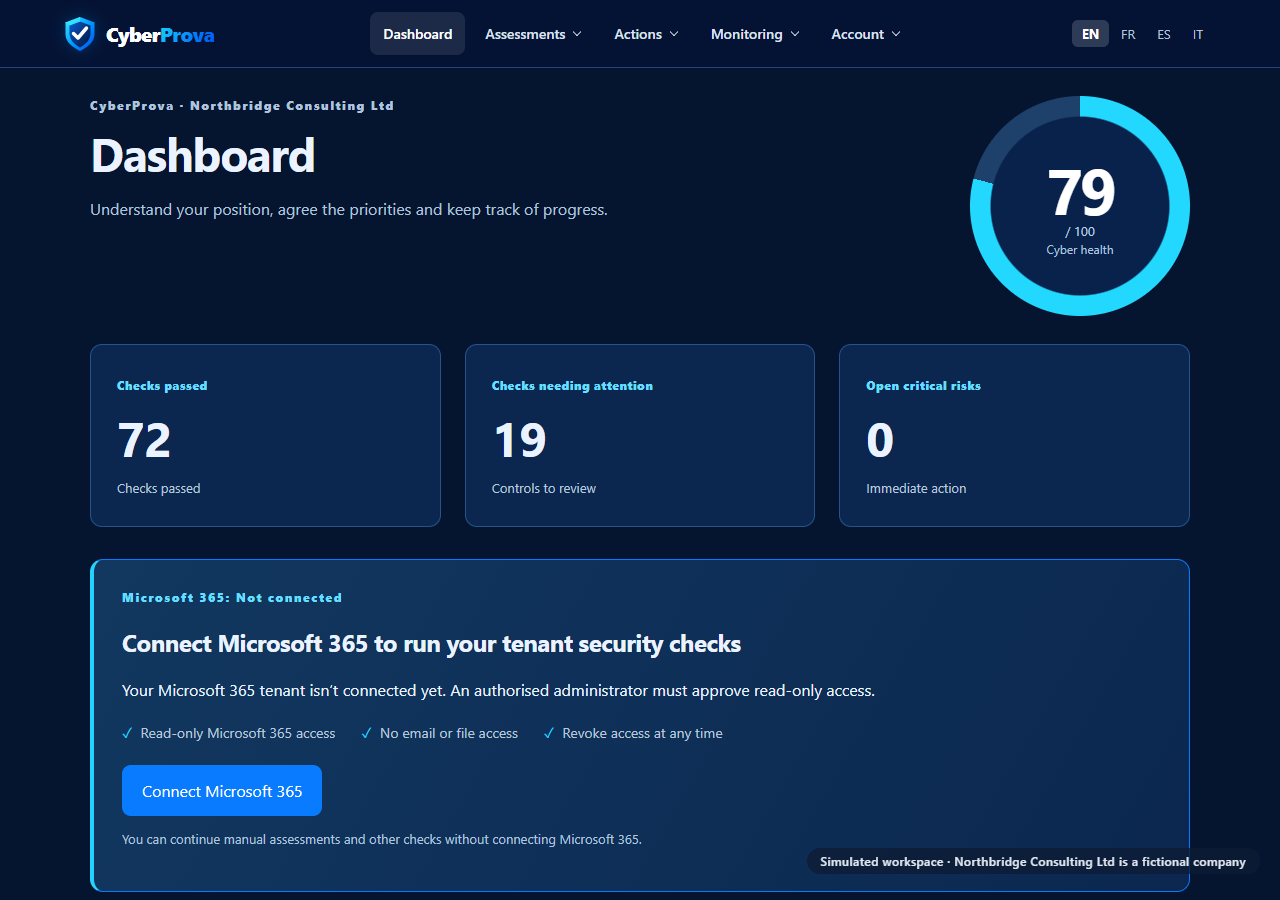
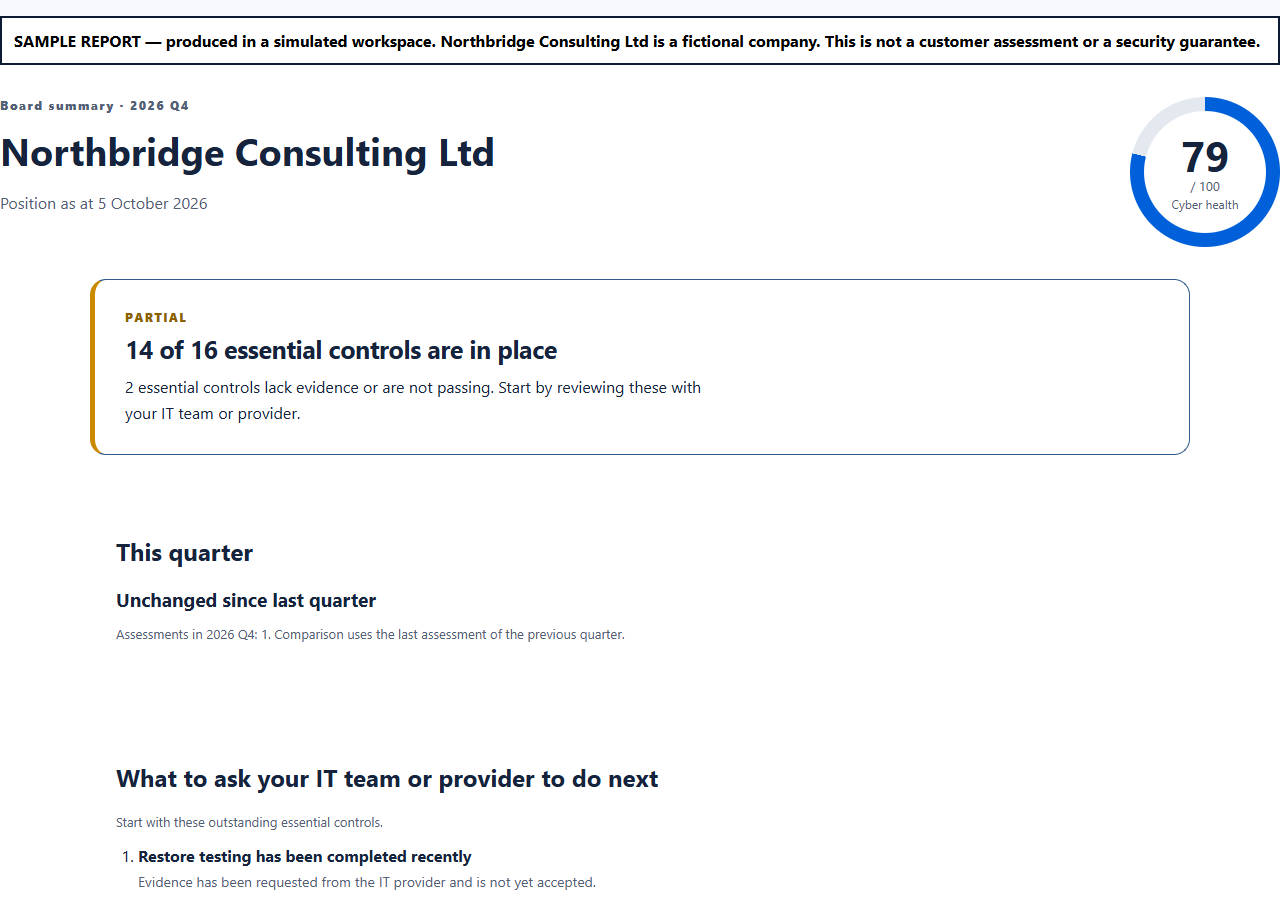
SEE IT IN ACTION
See what is supported by evidence, what remains open and who owns the next action.
PRICING
The Free plan includes three assessments and three website scans, so you can see where you stand before you pay anything.
Free: 3 lifetime core assessments, on-screen findings and summary, plus evidence requests. No credit card required.
Business: add report exports, remediation management, questionnaires and advanced assessments.
Professional: add scheduled assessments and change monitoring.
See where you stand, at no cost.
No card required
Turn your findings into evidence you can share.
£59 per month, cancel any time
Keep your security checks running automatically.
£129 per month, cancel any time
Need support for a larger organisation? Contact us.
Free needs no card. Paid plans start billing at checkout and exclude VAT where applicable. Prices are shown and charged in GBP.
A hostname is a website address, such as www.example.com. DNS checks assess domain and email settings. Zero Trust checks review identities, access and devices rather than assuming they are trusted.
Read-only access to your Microsoft 365 security settings, granted by one of your administrators. It can't change anything in your tenant, read your emails or open your files. The full list of permissions is on our Security page.
In Microsoft Azure data centres in the UK. Evidence files are stored privately and are only available to people in your workspace.
CyberProva gives you and your provider a shared record of findings and supporting evidence. Providers receive a secure upload link and need no CyberProva account to respond.
No. Findings are written in plain English, with why each one matters and what to ask your provider to do.
No. CyberProva helps you understand and evidence your controls. Certification is carried out by an accredited Certification Body.
Yes. Monthly plans can be cancelled at any time from your billing page, and your saved results stay readable on the Free plan.
See automated Microsoft 365 findings, collect supporting evidence and agree the next actions with your IT team or provider. Start free.