Microsoft 365 security guide
Microsoft 365 security evidence for law firms
A managing partner needs more than reassurance that the firm's IT is secure. Establish who can access matter correspondence and documents, how payment instructions are checked and what evidence supports the firm's position. CyberProva can help organise selected Microsoft 365 findings within that wider review.
Published · Last reviewed · By CyberProva
Run your free Microsoft 365 security assessmentNo card required · Optional read-only Microsoft 365 connection
Review who can reach matter information
Matter documents can move between a case-management system, email and shared Microsoft 365 locations. A tenant-level setting does not establish who can access every matter or whether an ethical restriction is being applied.
- Identify where matter correspondence and documents are stored and who administers each service.
- Ask for a dated access review covering support staff, locums, consultants, external guests and provider accounts where relevant.
- Have the responsible team review sharing links and access to a suitable sample of restricted matter locations.
- Record access-removal actions at staff departures or matter handovers without collecting unnecessary client documents.
Treat payment instructions as a separate control
The SRA's cybercrime resources describe fraud involving altered payment instructions. Reviewing account protection is useful, but your firm also needs to establish how staff verify instructions and escalate discrepancies.
- Ask for MFA enforcement and administrator-access evidence for the accounts used in client and finance communications.
- Request the IT provider's review of relevant forwarding rules and unusual access concerns.
- Review the procedure for confirming changed bank details using established, independently checked contact information.
- Discuss a redacted process example with the finance or compliance lead; do not use a settings score to approve a transfer.
Give partners a clear evidence discussion
Separate confirmed settings observations, evidence accepted by the firm and questions that remain open. Explain which client services could be affected and what decision the partners need to make.
- Keep the assessment scope and exclusions visible alongside the report.
- Identify any recovery evidence needed for email, document storage and the separate case-management service.
- Agree who will obtain missing records or implement changes and when the findings will be reviewed.
- Use the SRA and Law Society resources with the firm's responsible advisers when considering wider professional obligations.
How Lexcel fits risk and information management
Lexcel is the Law Society's practice-management quality mark, covering areas including risk and information management. A firm seeking or maintaining accreditation can use dated control records in its wider management review; a CyberProva assessment is not Lexcel accreditation or a blanket cyber certification.
- Ask the person responsible for Lexcel to map relevant evidence to the current standard and the firm's policies.
- Keep training, information-handling, supplier and incident-process records alongside technical observations.
- Use the accreditation process and appropriate advisers to establish what the firm needs to demonstrate.
UK GDPR security: technical and organisational measures
The ICO's security guidance links appropriate technical and organisational measures with risk, confidentiality, integrity, availability, recovery and testing. For a firm handling personal information, settings evidence is one input to that review. The ICO currently marks this guidance as under review; check its latest publication when applying it.
- Review the risks in the firm's actual processing and information flows with the responsible data-protection lead.
- Keep evidence of access reviews, staff procedures, recovery tests and follow-up improvements.
- Do not treat a tenant score as proof of UK GDPR compliance or legal professional privilege.
Client money and the SRA Accounts Rules
For firms within their scope, the SRA Accounts Rules address client-money handling and appropriately authorised and supervised withdrawals. Entra or Exchange settings alone cannot establish compliance with those requirements.
- Have the finance and compliance leads review the controls appropriate to the firm's transactions.
- Retain proportionate, redacted records of payment authorisation, independent verification and supervision.
- Separate a technical account-protection observation from a conclusion about a particular withdrawal or the firm's Accounts Rules compliance.
Where to check this in Microsoft 365
Ask your authorised administrator to inspect these areas for the accounts, services and devices in scope. These are review locations, not instructions to change settings without a plan.
MFA: Conditional Access or Security Defaults
Microsoft Entra admin centre: Entra ID > Conditional Access > Policies; Entra ID > Overview > Properties > Security defaults; Authentication methods > Activity for registration reports.
Conditional Access needs Entra ID P1 or P2; Business Premium includes P1. Security Defaults is available with Entra Free and is an alternative baseline, not an additional layer to enable alongside Conditional Access.
Administrator access: Entra roles and PIM
Microsoft Entra admin centre: Entra ID > Roles & admins for current assignments; ID Governance > Privileged Identity Management for eligible access and activation settings where licensed.
PIM needs Entra ID P2 or Entra ID Governance for relevant users. It is not included simply because a tenant has Business Premium/P1. Emergency-access readiness needs human review.
External email forwarding: Exchange Online
Exchange admin centre: Recipients > Mailboxes > mailbox forwarding, plus Mail flow > Rules and remote-domain settings. Review inbox rules separately. In Microsoft Defender, inspect outbound anti-spam policies and their external-forwarding settings.
External file access: SharePoint and OneDrive
SharePoint admin centre: Policies > Sharing for tenant settings and Active sites > selected site > Settings for site sharing. Review individual OneDrive/site permissions, sharing links and guests with the responsible owner.
What CyberProva can check automatically
Read-only observations depend on the selected plan, Microsoft licensing, consent and available data. Missing access is a gap, not a pass. Review the documented permissions and deployment limitations.
- MFA: Conditional Access or Security Defaults: Core: selected Conditional Access policy observations. Business and above advanced assessments: supported MFA registration, policy-coverage and Security Defaults observations. These are not proof that every sign-in is protected.
- Administrator access: Entra roles and PIM: Core: current directory-role assignments and Global Administrator principals. Advanced: supported standing-access observations when the required sources are available. Core counts do not resolve group membership or all eligible PIM access.
- External email forwarding: Exchange Online: CyberProva's basic Graph connection does not enumerate Exchange inbox rules, mailbox forwarding or transport rules. These are evidence-based controls, not automatic mailbox-content checks.
- External file access: SharePoint and OneDrive: Business and above advanced assessments can read selected tenant-wide sharing and link settings when permitted. They do not perform a file-by-file or matter-by-matter access audit.
What you should request from your IT provider
Keep the source, date, scope, exceptions and reviewer with each record. Submission and acceptance are separate; your organisation decides whether the evidence supports the claim.
- MFA: Conditional Access or Security Defaults: Dated policy state, targeted users/apps, exclusions, authentication strengths and registration records; representative sign-in evidence reviewed by an administrator. Report-only policies and registration alone do not establish enforcement.
- Administrator access: Entra roles and PIM: Role assignments, separate admin-account records, PIM activation and approval requirements where used, and reviewed emergency-access custody, monitoring and test records. A named role does not establish business need.
- External email forwarding: Exchange Online: A dated forwarding/rule inventory with destinations and exceptions, applicable outbound spam and mail-flow policies, and an administrator's review of suspicious or unexpected changes.
- External file access: SharePoint and OneDrive: Tenant and relevant site sharing settings, approved guest/link exceptions and sample access-review outcomes. Record who approved external access and what was removed after the review.
Make the answer provable
Evidence pack for this guide
- A matter-information map and dated access-review records for the services in scope.
- Microsoft 365 MFA policy, privileged-access and provider-supplied sharing or forwarding evidence.
- A redacted payment-instruction verification record and escalation procedure.
- Recovery-test results, unresolved findings and the decisions requested from partners.
How CyberProva helps
CyberProva helps your firm review selected Microsoft 365 observations and request supporting records from its IT provider. The firm accepts or rejects submitted evidence; CyberProva does not independently verify every underlying fact. Free includes 3 lifetime core assessments and an on-screen summary. Business and above add board-report exports and remediation management, which can support a partner review. The firm supplies the professional context and approves any conclusions.
See what a Microsoft 365 security assessment should cover →
See exactly what CyberProva checks · Learn how CyberProva assesses security · Review Microsoft permissions
Practical example
Example: fraudulent change to client payment instructions
Illustrative prevention scenario, not a customer incident. An attacker compromises a solicitor's email account or impersonates the firm, then sends a convincing instruction asking a client to use different bank details. Technical account protection and financial verification need separate evidence.
- Administrator review: use appropriate MFA policies, including phishing-resistant authentication for privileged or higher-risk access where suitable. Check scope, enforcement and emergency-access arrangements with the authorised team.
- Provider evidence: review suspicious Exchange Online forwarding and inbox rules, relevant alerts and the named monitoring/escalation owner. CyberProva's basic connection does not enumerate those rules.
- Business procedure: confirm changed payment instructions through an independently verified telephone number or established contact route, rather than details supplied in the suspicious message.
- Financial controls: use appropriate authorisation and separation of duties for transactions, with staff and client awareness of altered payment instructions.
- CyberProva's role: collect supported settings observations and help record reviewed evidence of organisational controls. It cannot independently establish that a callback happened, a payment was legitimate or Accounts Rules obligations were met.
What this cannot establish
- CyberProva does not establish compliance with SRA rules, legal professional privilege, client-money controls or every confidentiality obligation. Relevant legal and professional judgements remain with the firm and its advisers.
- Selected Microsoft 365 observations do not audit a case-management system, verify a bank instruction or investigate an incident. Commission additional review where the question requires it.
Common questions
Does CyberProva certify SRA compliance?
No. It supports a review of selected controls and evidence. It does not certify SRA compliance, provide a regulatory audit or replace advice about the obligations applying to your firm.
Does the Microsoft 365 connection read our client emails or matter documents?
The connection uses supported read-only settings and directory checks; it does not read email bodies or file contents. Evidence files that your team or provider chooses to upload are handled separately. Review the permissions and data-lifecycle pages before connecting.
Will it validate matter-level confidentiality or ethical walls?
No. A tenant-level assessment does not establish every matter permission, conflict restriction or ethical wall. Ask the responsible administrators and advisers to review those controls in the systems where they operate.
Can we view a report before buying?
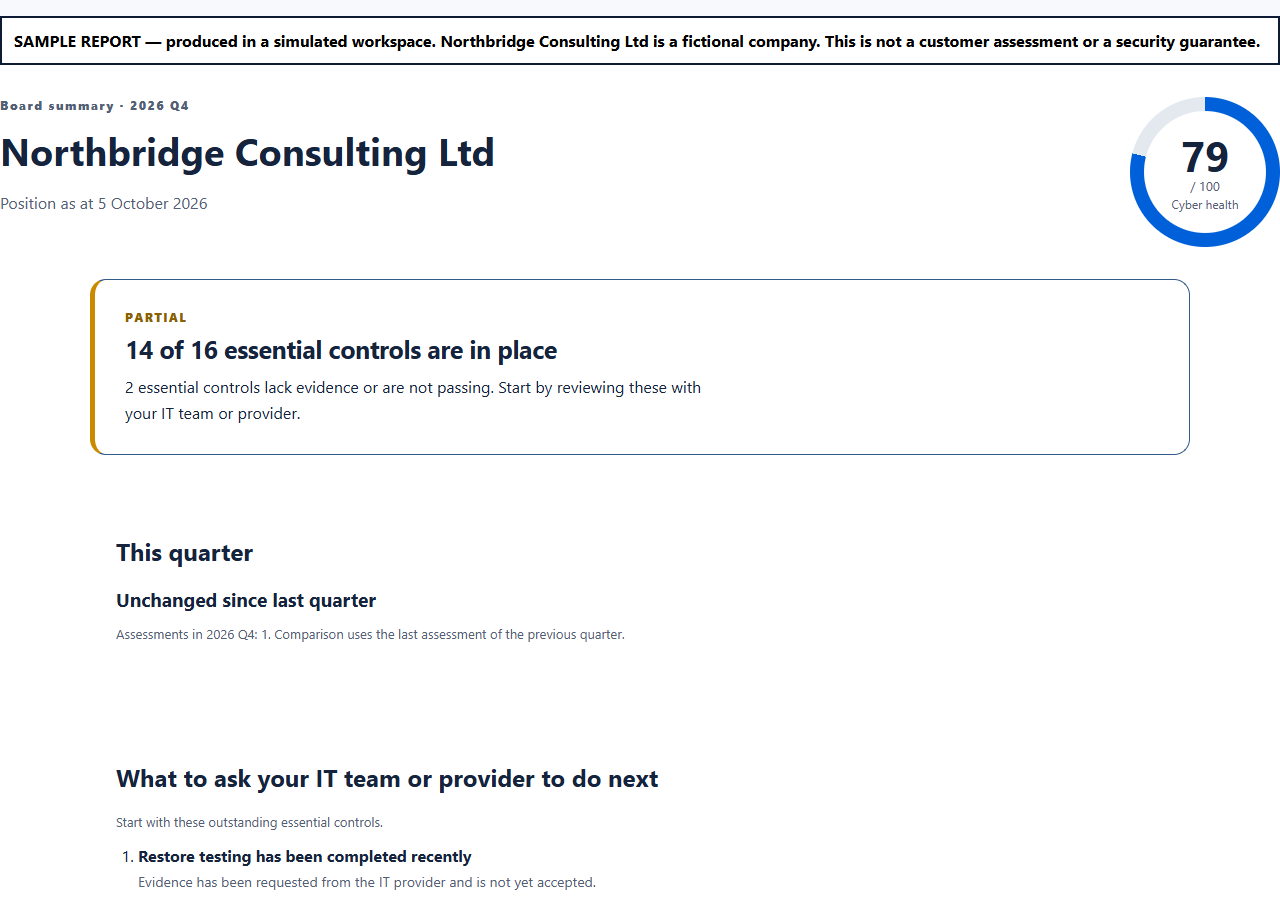
Yes. The public sample board report shows the format using a fictional company's data. Your own report exports require Business or above. A report is a discussion aid, not an audit opinion.
Official guidance
Use these sources with your IT provider when reviewing the controls described above.
From assumptions to evidence
See what needs attention in your organisation
Start with a free CyberProva assessment. Review the findings, identify evidence gaps and agree priorities with your IT team.
Free includes 3 lifetime core assessments. Report exports and advanced features require a paid plan.